


Z-Wave Long Range
Get reliable signal up to 1300 feet from your hub (if it supports ZWLR). Fast and secure direct communication in star topology network.

S2 Security
This device is equipped with the highest level of S2 security for a safer network and encrypted signal communication.

SmartStart
Z-Wave Plus certified and SmartStart ready, the sensor comes with its unique QR code and PIN for authentication.

Adjustable Settings
Program just the right lux trigger and motion clear reports for your scenario. Motion sensitivity is adjustable too, as long as your hub supports parameter access.
Go Outside
Meet the latest version of our popular outdoor Z-Wave motion sensor. This is a an innovative detector packed with features. You can depend on it for both security and automation.
Smarter Outdoor Lights
Automate outdoor lighting by pairing your motion sensor with any switch or dimmer from our portfolio. Ensure a clear pathway to the front door or garage after dark.
Live Data From Outside
You’ll get motion, lux, and temperature reports to your hub how often you need them. Customize reporting behavior in advanced settings and use this valuable data to automate lights, HVAC equipment, and more.
It Works Indoors Too
While the sensor is rated for outdoor use, it can be just easily used inside of your home. It’s small enough to blend into any room and you can power it with included batteries or optional 12-24 V if you prefer a low-Voltage power supply instead. Make it your own!
Hardware Features
Built on the Z-Wave Long Range 800 series chip, the Outdoor Motion Sensor delivers fast, reliable detection with low power use. Wide coverage, ambient light sensing, and an adjustable mount give you precise control over where and when automations will activate.
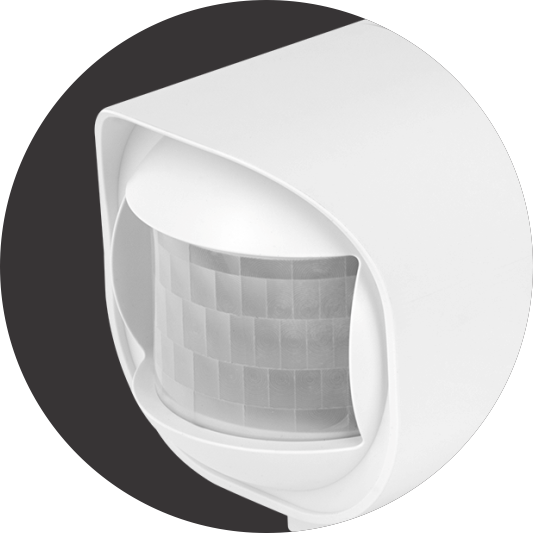
120° PIR SENSOR
Detect activity up to 30 feet with the longest range to the sides of the sensor. It works great for early detection across open outdoor spaces.

LUX SENSOR
Fine-tune lighting automations based on ambient brightness, keeping lights off when they’re not needed.

TEMPERATURE SENSOR
Get more data out of your sensor to build a truly intelligent home with custom HVAC automations and extreme temperature notifications.
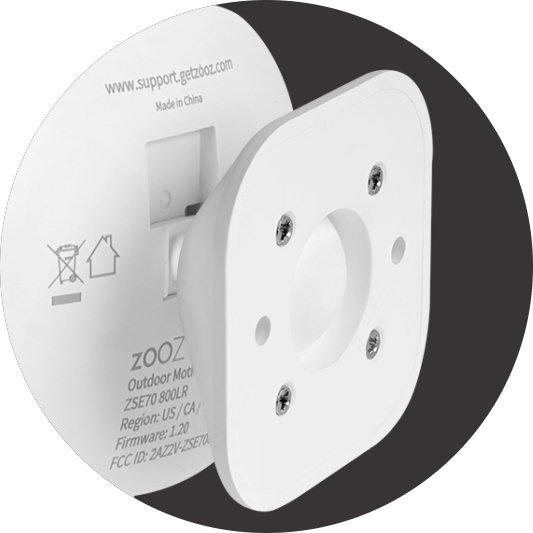
PRECISE MOUNT
Install the mounting bracket on any flat surface and fine-tune the angle to monitor exactly what matters.
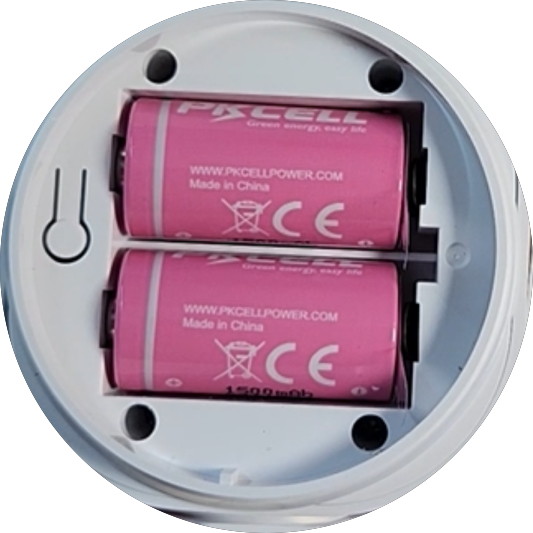
BATTERY POWER
The two included CR123A batteries will power your sensor for over a year with standard use, and longer when connected via Z-Wave Long Range.
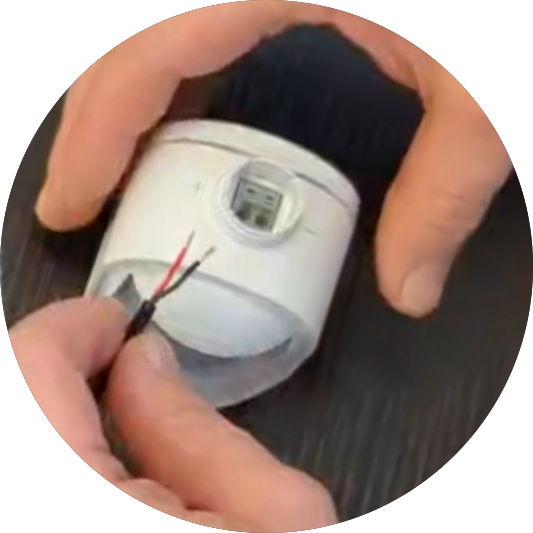
12-24 V POWER
The sensor comes with optional 12-24 V terminals so you can utilize existing wiring to power it with safe low Voltage connections.
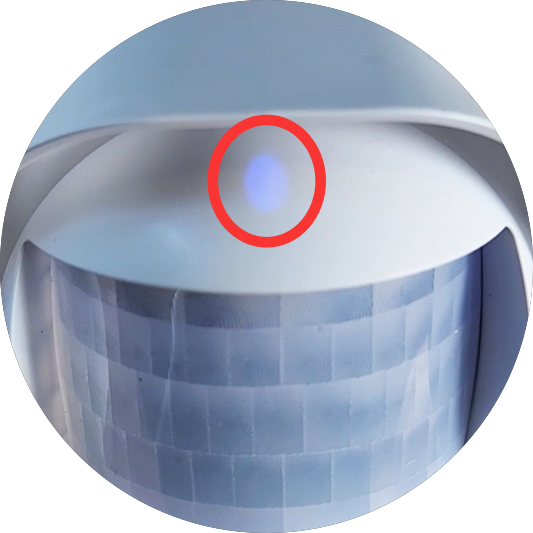
LED INDICATOR
The LED indicator is located under the sensor's lens to provide a visual cue for motion detection and help troubleshoot the device if needed.

Z-WAVE CHIP
The Z-Wave 800 chip delivers extended range while reducing power consumption across the network.
Software Highlights
With flexible settings and plenty of customization, this Outdoor Motion Sensor lets you build automations your way. It works just as well for security as it does for everyday smart home projects.
Z-WAVE LONG RANGE
Get up to 1,300 ft of direct hub-to-device range with ZWLR for exceptional reliability.
CORRECTIVE OFFSET
If the reported values are not 100% synced with other devices, manually offset them.
ADJUSTABLE MONITORING
Decide how often the sensor checks for ambient temperature and lux changes.
SMARTSTART
Quick QR-code pairing with a unique security key for encrypted communication.
CUSTOM REPORTING
Get only the data you need. Adjust the sensor's sensitivity or motion clear delay.
Z-WAVE REPEATER
When you add the sensor on 12-24 V power, it will act as a repeater to boost your network.
You said it
Resources
- Z-Box Hub (recommended for all Zooz products)
- Home Assistant
- HomeSeer (Z-Wave Plus or Z-Wave JS Front End)
- Hubitat (with custom driver)
- Homey
- Indigo (NOTE: no security, Indigo does not support S2 Z-Wave security)
- SmartThings Hub (with Edge driver)
If you don’t see your Z-Wave hub on this list, click hear to learn more about compatibility.
INSTALLATION QUESTIONS
Can the ZSE70 be installed outdoors?
- Yes, the ZSE70 is IP66 rated. While an IP66 rating does offer a high level of water-tightness against splashes, sprays, or jets – typically in addition to a dust-tight seal – this is not technically waterproof so we recommend some protection from the elements to ensure devices longevity. Make sure the installation location is a clean, flat, and dry surface.
- Test the device before mounting it (see the device manual for tips on how to test the unit’s Z-Wave functionality and motion detection). Some other mounting tips:
- Your S2 Motion Sensor best detects movement to the sides of the lens rather than directly in front of it
- Avoid extreme temperatures and don’t submerge in water.
- Don’t position it facing up into direct sunlight or above any source of heat (radiator, boiler, etc.).
What is the operating temperature of the ZSE70?
- 10°C to 50°C / 14°F to 122°F
What are the dimensions of the ZSE70? How big is the device?
- 2.34” x 2.4” x 2.75”
What is the wireless range of the sensor?
- The sensor has a range of up to 130 feet line of sight in a mesh network and up to 1300 feet when included using Long Range with a Long Range supporting hub.
- When including the ZSE70 via the Z-Wave mesh, it is the hub that decides the communication route to each device. The more signal repeating (non-battery powered) devices included on your network, the stronger it is and easier it is for the hub to reach devices that are further away.
- Environments with a lot of glass or metal elements, large furniture, and thick walls can also be very disruptive to Z-Wave signals.
What Power Supply can I use with my ZSE70 if I don’t want to use batteries?
- The ZSE70 can be powered by any 12-24V AC/DC power supply. We’ve linked one below that is available from The Smartest House. This power supply is 80″ in length; if a longer supply is needed, it can be extended with a pair of 18-24 AWD wires that can pigtail with the power supply cable.
What is the minimum and maximum voltage of the 12-24V AC/DC power supply?
- The voltage can be as low as 5V in some instances; however, the maximum voltage applied can only be about 24.5V. Anything exceeding the recommended 24V may damage the device and render it unusable.
What kind of battery does the ZSE70 use / need?
- The ZS70 can be powered by either 2 x CR123A (3 V) batteries or 12-24 V AC/DC.
- NEVER include the sensor powered with 12 V and then switch over to batteries without excluding and re-including on battery power. Your hub will continue to recognize the sensor as a Z-Wave repeater until excluded and re-included on battery, and the batteries will drain quickly. Always include the sensor powered by batteries only if you’re planning to use it as a battery device.
What is the battery life of the ZSE70?
- You should get around 9-12 months out of the ZSE70 sensor with normal use. Batter life is highly dependent on a number of factors, so a firm number is difficult to establish. The battery life can be affected by certain parameter settings, distance to the hub, number of repeaters, strength of mesh or distance when included via LR, signal interference, etc.
Will it work in environments colder than what it is rated for? (Battery Power)
- Cold temperatures can reduce ion mobility, increasing the batteries’ internal resistance and dropping the output voltage. No energy storage is lost, it’s just that the energy doesn’t get to the device, it dissipates internally. So in cold weather it may stop responding, but once it warms up, it should still operate and respond. The sensor needs a certain amount of voltage from the battery to report, and when that energy is dissipated due to the cold, you get a loss of function until the battery is warmed.
Can I use rechargeable batteries?
- We don’t recommend it. Rechargeable batteries usually decrease in max voltage with time, so you may see a shorter battery life if using these. The Z-Wave chip manufacturer also requires all Z-Wave devices to report low battery at 2.6V and many rechargeable batteries are not full 3V when charged so it may seem like the battery is empty even at full charge.
What voltages should the battery report for 100% and when there is a low battery alert?
- 3.2V – 3V is a full battery (100%) and the Z-Wave chip manufacturer requires all Z-Wave devices to report low battery at 2.6V.
How do I get the most battery life out of my ZSE70 sensor?
- We recommend pairing Z-Wave devices to your hub without security (if your hub lets you choose during inclusion). S2 security adds an additional layer of information to communicate with your hub which can drain the battery quicker than you’d like, in rare cases.
- Distance to the hub will also impact battery life, if the sensor is included to the mesh and utilizing multiple repeaters to reach the hub.
How do I turn off the LED indicator on my ZSE70 sensor?
The advanced settings/parameters/preferences give access to the custom settings for the device, and the LED Indicator behavior can be programmed in Parameter 6. You can search the Knowledge Base for “How to Access the Advanced Settings for the ZSE70 on___” if you have questions on how to access the advanced settings on your hub.
Parameter 6: Decide whether you want the LED indicator to light up when motion is detected or not.
Values: 0 – LED Off; 1 – LED On. Default: 1.
What is the warranty coverage for the ZSE70?
- Zooz 500 series devices are covered by a 12 month warranty. Zooz 700 and 800 series devices are covered by a standard 1-year warranty and by an extended 5-year warranty if registered within 30 days of purchase. Please register your device here and review the full warranty policy here.
Where can I find the ZSE70 device manual online?
PRODUCT FUNCTIONALITY QUESTIONS
Does this sensor report temperature and humidity?
- The ZSE70 sensor will report motion, temperature and light/lux. It does not report humidity. For an outdoor humidity sensor, we would recommend the ZSE44 XS Sensor.
What is the accuracy of the Temperature Reporting?
- -10°C to 50°C / 14°F to 122°F with accuracy of ±2°C
What is the tamper alert I’m receiving from the sensor?
- The ZSE70 tamper state is activated by shaking the device. The tamper alert is a security alert so you are aware if someone is trying to move the device.
Can I program the sensor to trigger other devices via direct association in case the hub is offline?
- Yes, you can program the ZSE70 to trigger other Z-wave devices, like a light switch, via direct association. The device communicates directly with the switch allowing for quicker responses and can then send the command even if the hub is down.
- Both devices need to be included on the same security level in order to be associated. The highest security level the ZSE70 supports is S2 Authenticated.
- You can read more about direct association in this article.
It takes 10-20 seconds for the sensor to detect motion again after changing back to ‘no motion detected’ status – is that normal?
- Yes. Any Z-Wave motion sensor will have a cooldown period of 10-20 seconds depending on the brand. A Z-Wave motion sensor will not act like your typical hardwired security sensor from an alarm panel which does not have a cooldown time. This cooldown period was implemented for two reasons:
- To save battery life
- To not overflood the Z-Wave network with unnecessary reports.
- The default for the ZSE70 is 30 seconds; however, if your hub provides access to the advanced settings, you can adjust this value anywhere between 10-3600 (seconds).
Will the ZSE70 act as a signal repeater for other Z-Wave devices in my network?
- Only when powered via 12-24V AC/DC power.
- If powered by battery, the ZSE70 will not be a repeater. Battery powered devices are not signal repeaters, as this would drain the battery within 24 hours.
Z-WAVE QUESTIONS
Do I need a Z-Wave hub to buy this device?
- Yes. The ZSE70 sensor is a Z-Wave device which would need a Z-Wave hub in order to receive the motion, temp, and light reports and to customize the advanced settings.
- To control or monitor any of our Z-Wave devices remotely through your smart phone, you’ll need a compatible Z-Wave hub. These devices require a central controller that communicates with them and sends commands. Once you have a controller, you would download that controller’s dedicated app on your phone and control your connected devices through that app.
Is the ZSE70 sensor compatible with my hub?
- You can find a list of compatible hubs for a given device under the Works With section on the product’s page. Here is the list of hubs compatible with the ZSE70.
Will this sensor work with my alarm panel?
- NO; it might pair with very basic binary sensor functionality for motion alerts only. Alarm panels like Alarm.com will typically only support single switches, door locks, select thermostats, and any authorized items on their list. We would recommend reaching out to your alarm panel company to verify compatibility and to get the latest on any device integrations they may be working on.
- To our best knowledge, most alarm panels don’t support multi-sensors so the ZSE70 won’t display correctly in their interface. There is nothing about the Outdoor Motion Sensor that we could change to improve compatibility with alarm panels, since this is a limitation of the alarm panel itself and how it supports binary and multi sensors. It would be up to your alarm panel to integrate the device, as it follows Z-Wave protocol and has been Z-Wave certified. There is nothing we can change on our end to have the device be recognized correctly. Read more about alarm panel compatibility here.
Where do I find all of my sensor’s advanced settings?
How do I add the sensor to my Z-Wave hub?
- SmartThings Installation articles
- Hubitat Installation articles
- Home Assistant Installation articles
- Z-Box Installation Articles
- Z-Wave System Installation articles
How can I tell what firmware my ZSE70 is running on?
- The firmware that your sensor is shipped with should be printed on the back of the device where the model specifications are. If your hub supports and properly integrates the device, you should also see the firmware listed in your Z-Wave interface.
- Firmware that is listed as 1.01 (or any other value with a 0 in the middle) in the sensor’s change log may display as 1.1 in your hub.
How do I update the firmware of my ZSE70 sensor?
- Some Z-Wave hubs have a built-in firmware updater that you can use. Otherwise, we recommend using the PC Controller tool on the Simplicity Studio Software as described here. You will need to register your device in order to have access to Zooz firmware files.
How long does the update take? How do I know when it’s finished?
- Firmware updates should usually take anywhere from 5 to 15 minutes depending on connection quality and how much information needs to actually be updated on a given device.
- If it is taking longer than that, please try to bring the hub / controller closer to the device that is being updated.
- If you are updating the sensor on battery power, you will need to manually wake the device to update.
Where can I find the history of changes and firmware updates for the ZSE70?
What series Z-Wave chip does the ZSE70 use?
- The ZSE70 uses an 800 series Z-Wave chip.
Is the ZSE70 available in other Z-Wave frequencies?
- The ZSE70 is currently available in 908.42 MHz (US) frequency only. We do not currently have plans to release it in EU or AU frequency at this time
Does the ZSE70 support Z-Wave Long Range?
- Yes, the ZSE70 supports Z-Wave Long Range (ZWLR). Note: in order to use ZWLR, both the hub and the end device must support ZWLR.
HUB SPECIFIC INSTRUCTIONS
- ZSE70 & Home Assistant
- ZSE70 & HomeSeer
- ZSE70 & Hubitat
- ZSE70 & SmartThings
- ZSE70 & Your Z-Wave System
- ZSE70 & Z-Box Hub
INSTALLATION INSTRUCTIONS
- How To Power the ZSE70 Outdoor Motion Sensor With 12-24 V
- How to Access the Battery Compartment for the ZSE70 Outdoor Motion Sensor
- How to Install the ZSE70 Outdoor Motion Sensor on Drywall
- How to install the ZSE70 Outdoor Motion Sensor on Siding
GENERAL INSTRUCTIONS & TROUBLESHOOTING
- How Do I Perform Factory Reset on My ZSE70 Outdoor Motion Sensor?
- Rapid Battery Drain on My ZSE70 Outdoor Motion Sensor
- Recommended Accessories for Your ZSE70 Outdoor Motion Sensor
- ZSE70 Outdoor Motion Sensor Advanced Settings
- ZSE70 Outdoor Motion Sensor Change Log
- ZSE70 Outdoor Motion Sensor Manual Wake-Up Process
- US English ZSE70 Product Manual
- (DE) ZSE70 Outdoor Motion Sensor Produktmanual
- (ES) Manual del producto Sensor de Movimiento Exterior ZSE70
- (FR) Manuel du produit Capteur de Mouvement Extérieur ZSE70
- (IT) Manuale del prodotto Sensore di Movimento da Esterno ZSE70
- (NE) ZSE70 Buitensensor Bewegingssensor Producthandleiding
- (PL) Instrukcja obsługi czujnika ruchu zewnętrznego ZSE70
- Model number: ZSE70 800LR
- Power: 2 x CR123A (3 V) batteries / 12-24 V AC/DC
- Motion Detection Range: up to 30 feet
- Temperature Range: -10°C to 50°C / 14°F to 122°F with 2°C / 1°F accuracy
- Light Sensor Range: 0 LUX to 30000 LUX with ±20% accuracy
- Dimensions: 2.34” x 2.4” x 2.75”
- Z-Wave Range: Up to 130 feet line of sight or up to 1300 feet with Long Range enabled on a Long Range supporting hub
- Installation and Use: Indoor or outdoor (IP66)
- Download the complete integration doc for ZSE70 including:
- Product images
- Z-Wave Command Classes
- Product Type
- Engineering Specs
- UI Product Features
- Full product name: Zooz Z-Wave Long Range Outdoor Motion Sensor ZSE70 800LR
- Short product name: Outdoor Motion Sensor ZSE70
- Product ID: 027A 0004 0006
- Help Portal
- Product Manual
- Advanced Settings (Parameter) Labels and Descriptions